Does your ISP tap your internet speed? Does your university or school limit your browsing speed?
Don't you worry, justfollow these steps and you will be fine.
Note: This method usually works in most of the local ISP and Cyberoam. If it doesn't work for you don't blame me you are not luck enough.
Just follow these method and you will be fine.
Step One:
Open your command prompt as administrator.

Step Two:
Type the following commands.
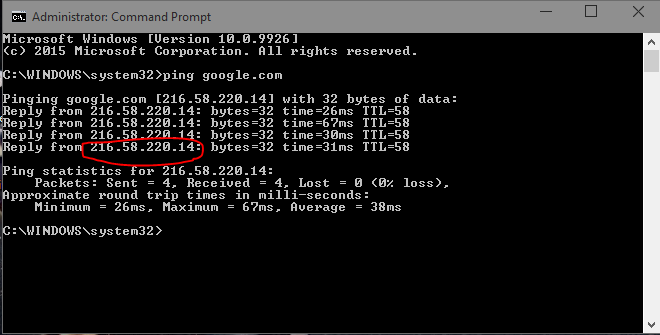
So when you ping you will get the IP.
Step Three:
Type the following commands
Now to confirm that the packets are being transferred open your task manager.

If your service provider has tapped you for 240kb/sec doing this will once will break the network ping and you can use it with more speed.
The following method is for Cyberoam users only. (Collages, offices and schools with cyberoam security.)
Step four: This is for Cyberoam users. This is the security used in my university. There are a lots of ways to by pass this security, I wont be discussing that here, but the following technique will hike the download speed to 73mb.
Open 15 command prompts and type the following commands in all of them


Deducting the request speed, you get almost 10mb/sec. If the servers are not busy there are times when I got 75mb/sec speeds.
Don't you worry, justfollow these steps and you will be fine.
Note: This method usually works in most of the local ISP and Cyberoam. If it doesn't work for you don't blame me you are not luck enough.
Just follow these method and you will be fine.
Step One:
Open your command prompt as administrator.
Step Two:
Type the following commands.
ping christuniversity.inyou will get an IP address of the site. You can substitute "christuniversity.com" with any other sites.
So when you ping you will get the IP.
Step Three:
Type the following commands
ping 10.5.2.229 -t -l 65500this will start sending packet datas to the IP address you have pinged.
Now to confirm that the packets are being transferred open your task manager.
If your service provider has tapped you for 240kb/sec doing this will once will break the network ping and you can use it with more speed.
The following method is for Cyberoam users only. (Collages, offices and schools with cyberoam security.)
Step four: This is for Cyberoam users. This is the security used in my university. There are a lots of ways to by pass this security, I wont be discussing that here, but the following technique will hike the download speed to 73mb.
Open 15 command prompts and type the following commands in all of them
ping 10.5.2.229 -t -l 65500Now open the 16th command prompt and type the following
echo off
color a
ping 10.5.2.229 -t -l 65500

The above image shows that I am transmitting 9mb/sec without browsing or downloading.
Now login to your Cyberoam portal
Now start downloading the file you want. You will find the download speed is very slow. Here I will demonstrate you with a driver download for my PC.
You can see my download speed as 9.2 mb/sec. But the speed is actually 9.2 -8.6= 600 kb/sec
That is lame so this is what you have to do.. During the download just log out from the cyberoam portal. You can see a sudden hike in the download speed.
Further any doubts, please mention in the comments.
Comments
Post a Comment